
Agents
Arugula runs coding agents two ways and treats both alike: when one asks something, it’s a card that you or a teammate answer from the pane, the swarm’s rail, your phone or a notification.
- Agent blocks: Claude Code, Codex or any ACP agent, shown as a chat-like UI beside your terminals.
- An agent in a terminal pane: run
claudeorcodexas usual. Arugula reads its screen to know whether it’s working or needs you, and Claude Code’s hooks put its questions and permission prompts on cards.
Agent blocks aren’t available on Windows; agents in a terminal pane are (Known limitations).
Setting up
Section titled “Setting up”Agent blocks run each agent through a small npm package, its adapter, which needs Node 20 or newer.
In Getting started, open the Agents step and click Use Claude Code with Arugula, or run:
arugula setup claudeThis installs Claude Code’s adapter (or updates an older one), adds
Arugula’s MCP server to Claude Code so it can put builds, servers
and its own helpers in panes you can watch, and adds Claude Code’s
hooks so a terminal Claude’s questions and
permission prompts come to cards in the app and on your phone. It says what
changed, naming the settings file it wrote the hooks to (usually
~/.claude/settings.json). A Claude Code that was already running picks up
the hooks when you start it again.
The Agents step shows whether Claude Code has Arugula’s MCP server, and Questions on cards for the hooks.
arugula setup codexThis installs Codex’s adapter, which uses the codex in ~/.local/bin. To
give Codex Arugula’s tools, add the MCP server with
codex mcp add arugula -- arugula mcp.
arugula status lists each adapter and whether Claude Code has Arugula’s
MCP server. If Claude Code or Codex is installed but its adapter isn’t, a
banner below the top bar says so once and links to Getting started. When
an adapter is missing, Start an agent… and the block say so too, with an
Install button that runs the install in a new pane.
Installing the adapters by hand
The adapters are pinned to the versions Arugula is tested with, and go in
~/.local/share/arugula/agents/:
npm install --prefix ~/.local/share/arugula/agents/claude @agentclientprotocol/claude-agent-acp@0.85.0npm install --omit=optional --prefix ~/.local/share/arugula/agents/codex @agentclientprotocol/codex-acp@2.1.0Agent blocks
Section titled “Agent blocks”An agent block shows an agent’s session as a web UI instead of a terminal UI: its messages, its reasoning, each tool call with the command’s output, permission requests as cards with Approve, Always and Deny, a message box, Stop, and the cost of each turn. Paste, drop or 📎 an image or a file into the message box; an agent that takes images gets the image.
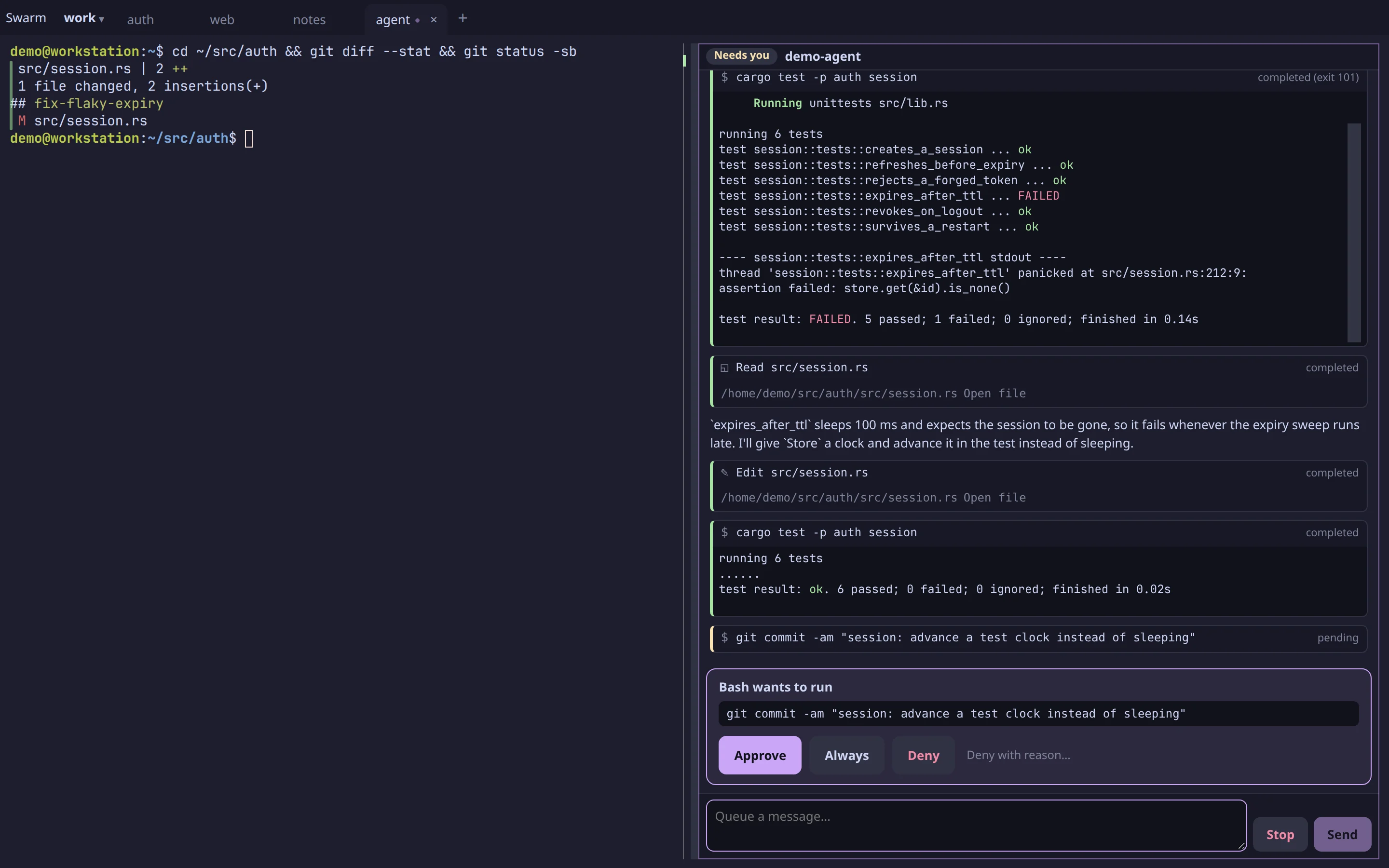
Start one from the pane toolbar’s + Pane › Agent (Ctrl+Shift+E, or ⌘⇧E on a Mac), Open beside › Start an agent… in a pane’s menu, New agent in the phone’s sheet, or the CLI:
arugula agent "fix the failing test" # Claude Code, here; prints its id (%N)arugula agent --codex "…" # Codexarugula agent --acp "CMD ARGS" "…" # any ACP agent serverarugula agent --model haiku --cwd ~/app --wait "…"-
Rules instead of asking. Always on a card saves the rule in Arugula, not in the agent: Arugula never picks the agent’s own “always” option, because that would write
.claude/settings.local.jsoninto your repository. From now on… on a card (shown to the machine’s owner) keeps a standing rule on this machine: the tool, or commands that start with a prefix, in the block’s folder and below, or in every agent block. Permission rules…, under This machine in the host menu (in the account menu when there’s no host menu), orarugula rules, lists the rules and forgets them. -
Starting with rules and a mode.
arugula agent --allow Bash --permission-mode acceptEdits "…", orallowandpermission_modeon MCP’sstart_agent, lets a lead agent pre-authorize the helpers it starts. An agent can’t start one that bypasses permissions. -
Your settings. Claude Code in a block runs without your settings files, so your own hooks don’t fire inside it.
--user-settingsgives it your allow and deny lists, default mode andCLAUDE.md, still with every hook off. -
Whose Claude Code login it uses:
- from
arugula agentor MCP’sstart_agent: theirCLAUDE_CONFIG_DIR; - from Start an agent… beside a terminal: the terminal program’s (on Linux);
- otherwise: the daemon’s.
A turn that fails on logging in says which login the block used and how to log in to it.
- from
-
MCP servers.
arugula agent --mcp 'NAME=COMMAND'gives the session an MCP server; its forms and sign-in links show as cards. -
Arugula’s own tools. Every agent block gets them, limited to its tab: it can start a dev server beside itself and show it in a browser block, start and answer other agents there, and read the rest of its tab, but not touch other tabs.
-
Restarts. Restarting the daemon mid-turn, even with an approval open, doesn’t touch the agent. After a reboot, the session picks up again.
-
Its record.
arugula capture %Nprints the transcript as Markdown,arugula historylists the agent’s commands and turns, andarugula searchcovers what agents said and ran.
Questions and forms
Section titled “Questions and forms”When Claude Code asks you a question, the block shows it as a card: buttons for one answer, checkboxes for several, each option’s description, an Other box, and an option’s preview (a mockup, some code) when you pick it. Then Submit, Skip (the agent hears you didn’t answer and goes on) or Stop (ends the turn). Any other form, such as an MCP server’s or Codex’s plan-mode question, is drawn from its schema, and an MCP server’s sign-in link is a card with Open link.
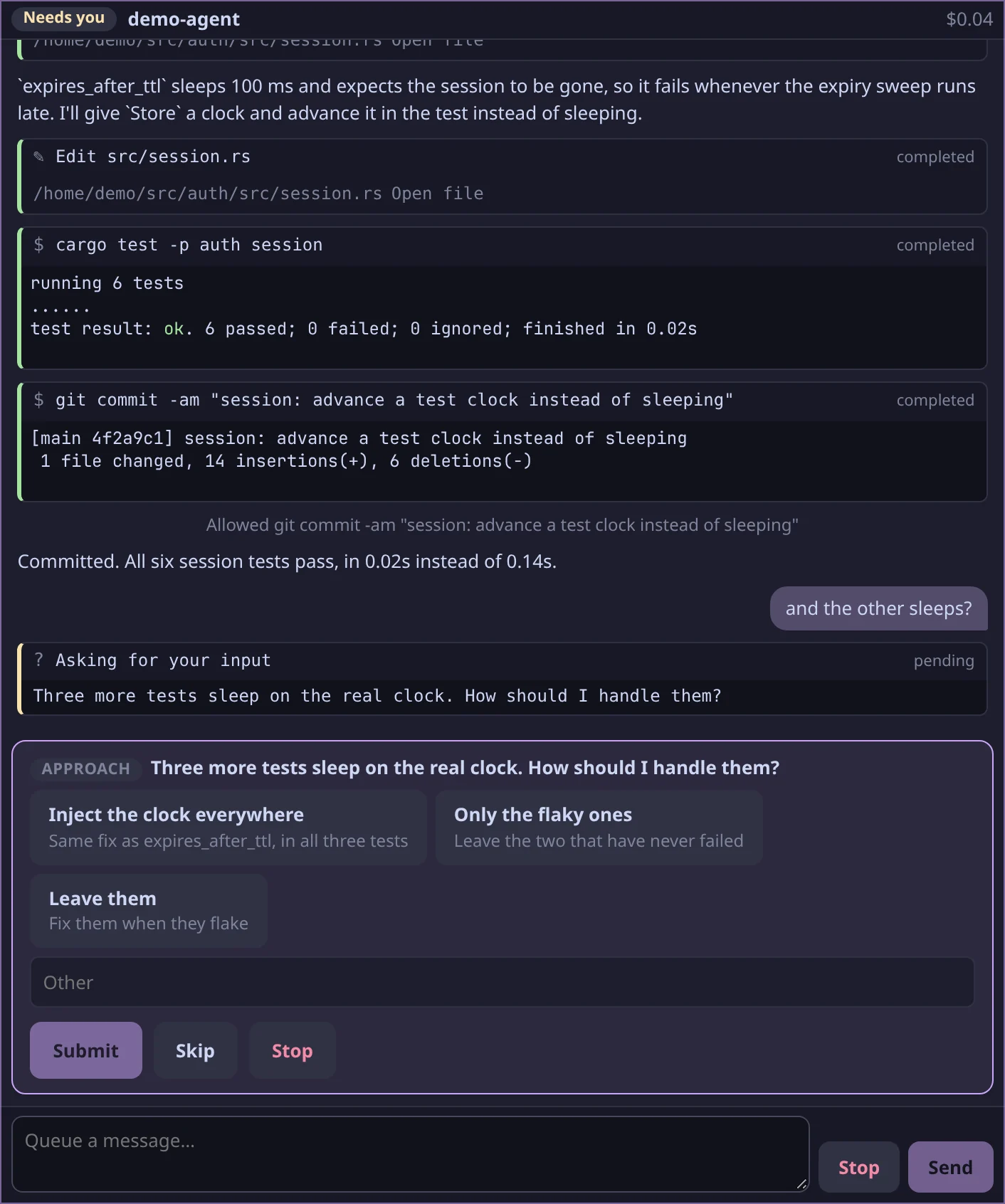
A question waits as long as it takes, survives a daemon restart and a reload, and the first answer from anywhere wins. The push notification shows the first question; a question with two options can be answered from the notification’s buttons.
From a script
Section titled “From a script”Every card has a CLI equivalent, so a script (or another agent) can drive an agent block.
arugula wait %5 --needs-input # wait until it asks; prints the request as JSONarugula call %5 approve # allow it oncearugula call %5 approve '{"option":"always"}' # allow it from now onarugula call %5 approve '{"option":"always","scope":"cwd","prefix":"cargo"}' # a standing rule (or "everywhere")arugula call %5 deny '{"reason":"use the test database"}'arugula call %5 answer '{"question_0":"Red","question_1":["A","B"]}' # answer its questionsarugula call %5 decline # skip its questionarugula call %5 send '{"text":"and then?"}' # the next message (queued while it works)arugula call %5 cancel # stop the turnarugula wait %5 --idle # until the turn ends: prints idle, done or needs-inputarugula tail %5 -f # its text as it growsarugula send %5 --wait 'and now the docs' # prompt it and wait for the turnquestion_{n}_custom is the Other box, and a multi-select takes a list.
arugula send --wait works on Claude Code or Codex in a terminal too, and
exits with:
| Exit code | Means |
|---|---|
| 0 | the turn ended |
| 2 | it needs someone (and nothing was typed if it already did) |
| 3 | it stalled: nothing started |
| 4 | still running at --timeout |
Chat blocks
Section titled “Chat blocks”A chat block is a plain conversation with Claude, as in Claude’s own app:
no repository, no shell, and none of a coding agent’s tools. Open one with
+ Pane › Chat, Open beside › Start a chat in a pane’s menu, New
chat in the phone’s sheet, or arugula agent --chat.
- It runs Claude Code on the machine’s own login, with every tool off and
none of your settings: no hooks, no
CLAUDE.mdand no MCP servers. No API key is needed. - Its bar picks the model. Until Claude Code titles it, after the first answer, it’s named by your first message.
- Messages are Markdown; paste, drop or 📎 attach images and files, as in an agent block.
- It belongs to the machine it was opened on, which keeps the conversation and brings it back after a restart. History and search cover it, as they do an agent’s transcript.
Codex isn’t offered as a chat: it has no way to turn all of its tools off.
Agents in terminal panes
Section titled “Agents in terminal panes”Arugula reads Claude Code’s and Codex’s screens in a terminal pane, with no hooks needed, so the pane shows whether the agent is working or needs you.
| State | What Arugula sees |
|---|---|
| working | a spinner, or “esc to interrupt” |
| needs you | a permission or trust prompt, with what it asks (“Claude Code asks to run rm -rf build”) |
| idle | an empty prompt box |
| done | an empty prompt box after a turn someone started, while nobody was watching |
Arugula finds the agent by what runs in the pane, so cd x && claude
counts. Other agents (aider, gemini, opencode and so on) are known as agents,
but their screens aren’t read, and going quiet never means one of them wants
you. For those, Arugula relies on hooks, notifications and the terminal bell.
arugula describe %N --detection shows how a pane’s screen reads: each rule,
what it saw, and which one fired.
A pane running Claude Code resumes its conversation after a reboot by default (Panes and sessions).
Claude Code in a pane
Section titled “Claude Code in a pane”Claude Code’s hooks make Claude Code in an ordinary terminal pane behave like an agent block: it tells you when it needs you, puts its questions and permission prompts on cards that anyone allowed can answer (from the pane, the swarm’s rail or a notification), and takes follow-ups from your team. Outside an Arugula pane the hooks do nothing, so they’re safe to keep everywhere.
Use Claude Code with Arugula (or arugula setup claude,
above) installs them. When a Claude Code in a terminal pane
waits for you, Arugula has never heard from its hooks, and Claude Code’s
settings don’t have them, a chip on the pane says Its questions could be
cards here and on your phone, with Set up, which does the same; start
that Claude Code again to use them. To install them by hand:
arugula hooks install # into ~/.claude/settings.json, keeping what's therearugula hooks install --dry-run # show the result firstarugula hooks install --project . # a project's .claude/settings.json insteadarugula hooks status # which of them are thereThe hooks it installs
arugula hooks install merges exactly this into the settings file:
{ "hooks": { "Notification": [{ "hooks": [{ "type": "command", "command": "arugula attention needs-input" }] }], "Stop": [ { "hooks": [{ "type": "command", "command": "arugula attention done" }] }, { "hooks": [{ "type": "command", "command": "arugula inbox", "asyncRewake": true, "timeout": 86400 }] } ], "SessionStart": [ { "hooks": [{ "type": "command", "command": "arugula inbox", "asyncRewake": true, "timeout": 86400 }] }, { "hooks": [{ "type": "command", "command": "arugula hook" }] } ], "PreToolUse": [ { "matcher": "AskUserQuestion", "hooks": [{ "type": "command", "command": "arugula ask", "timeout": 604800 }] }, { "hooks": [{ "type": "command", "command": "arugula hook" }] } ], "PermissionRequest": [{ "hooks": [{ "type": "command", "command": "arugula hook", "timeout": 604800 }] }], "PostToolUse": [{ "hooks": [{ "type": "command", "command": "arugula hook" }] }], "PostToolUseFailure": [{ "hooks": [{ "type": "command", "command": "arugula hook" }] }], "UserPromptSubmit": [{ "hooks": [{ "type": "command", "command": "arugula hook" }] }] }}Each group works on its own, so you can keep only the ones you want:
- Attention (
Notificationand the firstStop). Claude Code’s own message (“Claude needs your permission to use Bash”) becomes the headline thatarugula attentionshows. Without these, reading the screen is the fallback. - Questions (
PreToolUseonAskUserQuestion).arugula askshows Claude Code’s questions as a card over the pane (with a push notification), waits, and hands your answers to Claude Code, which then doesn’t show its own picker. Answer in terminal on the card gives you the picker instead; Esc or Ctrl+C in Claude Code withdraws the card. A question may wait up to 7 days (Claude Code’s default would give up after 10 minutes), and the card comes back if the daemon restarts meanwhile. - Permission prompts (
PermissionRequest, withPreToolUse,PostToolUse,PostToolUseFailureandUserPromptSubmit, so the card can tell when the terminal answered first). A permission prompt becomes a card with the tool, its input (the command, or the file and its diff) and Claude Code’s own “always allow” suggestions: Allow, Always: … (which keeps that rule, as the terminal’s option would), or Deny with a message Claude reads. Claude Code shows its own dialog too, and whichever is answered first wins. - Follow-ups (
arugula inboxonStopandSessionStart). A follow-up is a message you send the agent from a card, after answering it: Send a follow-up. The inbox hook waits after every turn and wakes Claude Code with the text as its next instruction, so it never mixes with whatever the person at the keyboard has half typed. A session nobody drives (claude -p, the Agent SDK) gets no follow-ups. - Session context (
arugula hookonSessionStart). When a session starts in a pane, the hook tells Claude Code what this machine offers that it wouldn’t otherwise reach for, such as writing a report into a block beside the pane rather than another tool’s page. It asks the daemon, waits at most 2 seconds, and adds nothing outside a pane or when the daemon doesn’t answer.
Claude Code plugin
Section titled “Claude Code plugin”Rather than running claude mcp add and arugula hooks install yourself,
you can install Arugula’s Claude Code plugin. It brings the MCP
server, these hooks and a short skill that tells the agent how to use
them (call capabilities first, wait instead of polling, show instead of
describing, draft forge writes as cards). In Claude Code:
/plugin marketplace add arugula-salad/arugula/plugin install arugula@arugulaThe plugin calls the arugula you installed, so arugula has to be on your
PATH. If it isn’t, the plugin tells you once when a session starts. If you
already ran arugula hooks install, each hook still runs only once: the
plugin’s copy does nothing wherever a settings file has the same hook. With the
plugin enabled, arugula hooks status names it and arugula hooks install
adds only permission rules.
Edits as diff cards
Section titled “Edits as diff cards”Claude Code in a pane treats the Arugula daemon as its IDE, the way it connects to VS Code, with no hooks needed. Each edit it wants to make (Edit and Write, in its default mode) waits as a diff card on the pane and on the swarm’s rail. Accept (or Change… first) and Claude Code writes it; Reject and it doesn’t. Its terminal prompt still works: when the terminal answers first, the card closes and says so.
- With the
PermissionRequesthook too, the diff card is what shows for an edit; the hook covers Bash and the other tools. - In
acceptEditsmode, Claude Code sends no diffs. - To see the diffs in VS Code with Claude Code’s extension instead, run
arugula ide --diffs "Visual Studio Code"or choose Diffs here on a card;arugula ide --diffs arugulabrings them back. - To turn diff cards off, install the daemon with
arugulad install -- --no-claude-ide(Service and logs).
Not available on Windows.
Answering from anywhere
Section titled “Answering from anywhere”When an agent on a machine you can see asks something (an agent block, or Claude Code in a terminal through its hooks), anyone who drives that session can answer it: from the card beside the pane, the swarm’s rail, the phone’s Needs you, or a notification.
- The first answer wins. Every card, the pane’s history (
arugula log %N --who,arugula history --kind answer) and the audit log say who answered (“Allowed by Sam, 14:02”). People who only watch see the card but can’t answer it. - Send a follow-up gives the agent its next instruction, recorded as its sender’s input. On a teammate’s personal machine you need their permission to drive first; the card offers to ask for 30 minutes. On a team’s machine, people who drive send straight away.
- Cards show who else is looking at them.
- The machine’s owner is always notified. Anyone else chooses Notify me about its agents (this session) or Notify me about every agent here, in the session menu or the phone’s sheet.
Answering from a script, through the daemon’s API
arugula attention --json # every pane that wants you, and whycurl --unix-socket "$ARUGULA_SOCK" -X POST localhost/api/attention/act \ -H 'content-type: application/json' -d '{"action":"allow","panes":[3,7]}'curl --unix-socket "$ARUGULA_SOCK" -X POST localhost/api/panes/3/followup \ -H 'content-type: application/json' -d '{"text":"now run the tests"}'/api/attention/act takes a pane or a list of panes, and an action:
action |
For | Also takes |
|---|---|---|
allow |
a permission request | option: "always", suggestion: N (which of Claude Code’s suggestions) |
deny |
a permission request | message |
answer |
a question | content (the card’s fields) |
dismiss |
anything | |
rerun |
a failed command | |
accept, reject |
a diff card | text (the file as it should be saved), for accept |
continue |
a stopped debugger in an editor in the swarm |
Each pane is checked and answered on its own.
Claude Code conversations
Section titled “Claude Code conversations”Every Claude Code conversation on a machine, from a terminal or the Claude desktop app’s Code tab, can be opened as an agent block and carried on there. Open beside › Claude Code conversations… in a pane’s menu, + Pane › Claude Code conversation, or Conversations in the phone’s sheet lists them by folder, newest first, with a search box. The first time a machine has conversations and none is open, a hint offers to pick one up. With more than one machine, it lists each machine’s under its name.
- Opening one shows its transcript in a stopped agent block. Nothing runs, and the block keeps reading the transcript as it grows, so you can follow a terminal session from your phone.
- Continue (or just send a message) resumes the session in the block,
with your settings, skills and
CLAUDE.mdas in the terminal, every hook off, and the model it last used.claude --resumein a terminal afterwards shows the new turns. Turns that Claude Code won’t remember on resume (for example, ones you rewound past) are collapsed under Not in what it remembers. - One that’s open somewhere else can’t be continued, because two writers would each lose the other’s turns. Fork makes a new session with its history and goes on in that.
- The list leaves out
claude -pand SDK runs (agent blocks among them), sessions archived in the desktop app, and ones whose folder is gone; All shows everything. The Claude desktop app’s chats aren’t here: they live on claude.ai.
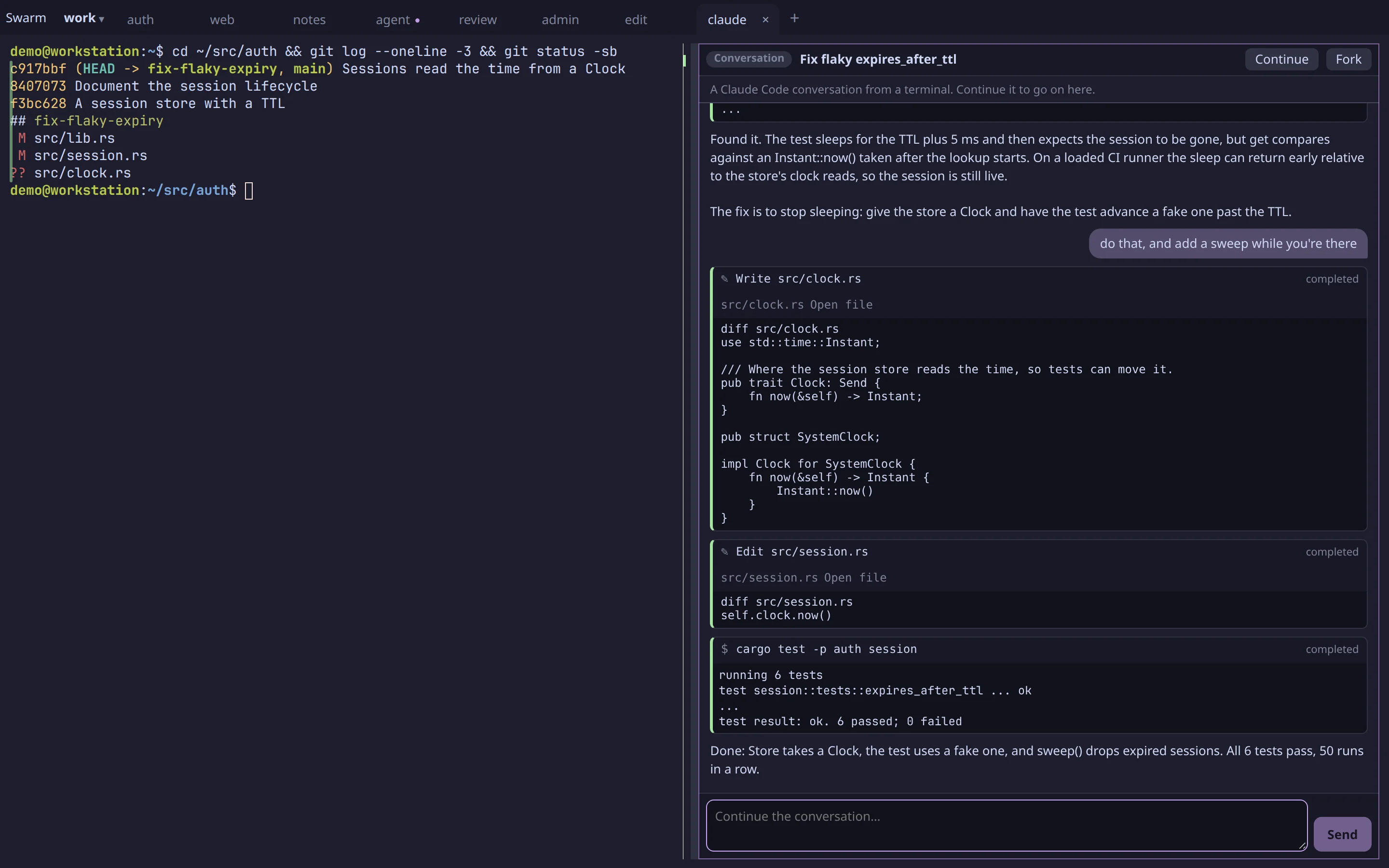
arugula claude ls [--live] [--all] [words] # this machine's (--host all: every machine's)arugula claude open 3fa9c1 # as a stopped block, following itarugula agent --resume 3fa9c1 "and now?" # continue it in a blockarugula agent --fork 3fa9c1 # a new session with its historyNext steps
Section titled “Next steps”- MCP tools: give any agent Arugula’s tools.
- Attention and history: the swarm, notifications and search.
- Pull requests and issues: agents draft, people send.